
My eSIM is stuck on “Activating”Updated 8 months ago
If your eSIM shows “Activating”, don’t worry, that usually means it’s waiting to connect to a local network.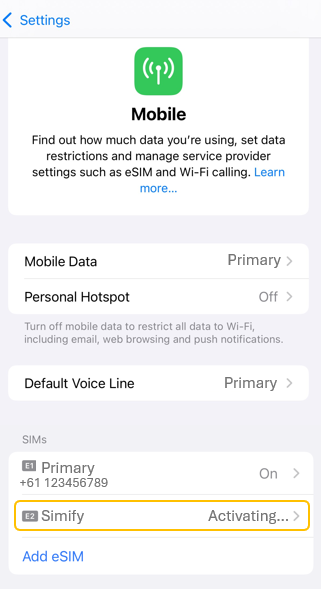
🌏 Have you arrived in one of the covered countries yet?
➡️ NO - You haven’t arrived yet
That’s totally normal! Your eSIM is simply trying to connect to a network that’s not available where you currently are.
To avoid unnecessary battery drain, you can:
Turn Mobile Data off for this eSIM, or
Temporarily disable the eSIM in your phone settings.
Once you land in a covered country, just turn it back on - and follow the activation steps -> Activate your eSIM on iPhone
➡️ YES - You’re already in a covered country
If you’re already at your destination and it still says “Activating”, try these quick steps:
Restart your device to refresh the connection.
Make sure Mobile Data and Data Roaming are both ON.
Wait a few minutes - it should change to “Activated” or “Connected.”
If it doesn’t, toggle Airplane Mode ON/OFF or check your APN -> eSIM APN Reference List
💡 Still stuck? Reinstall the eSIM using your activation email or contact our Support Team for help.